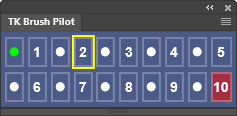
 TK Brush Pilot is a Photoshop plugin that helps to quickly navigate making changes to the opacity, flow, and hardness of Photoshop's Paintbrush tool from a single, clickable platform. No need for keyboard shortcuts that sometimes change layer opacity instead of brush opacity. No sliders, no drop-down menus, no click-and-drag, no modifier keys. Just click the plugin buttons to make changes.
This plugin is FREE if you opt-in to receive update information from Tony Kuyper Photography. Jump to the download section.
Features include:
NOTE: This plugin and the installation document are English-only and have not been translated into other languages.
The Brush Pilot plugin can be docked with other plugins and Photoshop panels, or it can be left floating in the Photoshop workspace.
Pull down on the bottom handle to reveal what each type of click does and how it is displayed on the plugin's interface.
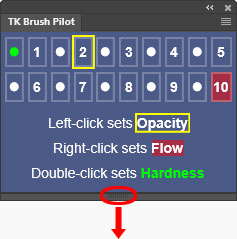
Clicking any button (left-click, right-click, or double-click) automatically selects the Photoshop Paintbrush tool (no need to do that first) and displays the brush's current settings for opacity, hardness, and flow according to the plugin's color-coding rules. The brush's diameter is also displayed in an orange box in the middle of the panel for five seconds each time a button is clicked.
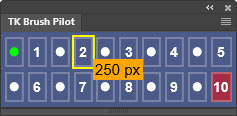
NOTE: Manually adjusting the brush's opacity, hardness, flow, or diameter using keyboard shortcuts or the Photoshop Options bar will NOT be reflected on the interface until the next time a plugin button is clicked.
Set brush opacity—Left-click (single-click) on a button to set the opacity of the Paintbrush tool in increments of 5%. • = 5%, 1 = 10%, • = 15%, 2 = 20%, • = 25%, etc. After clicking, the button displays a yellow outline corresponding to the chosen brush opacity. NOTE: To allow time for double-clicking, a half-second delay is needed before the opacity change takes effect.
Set brush flow—Right-click on a button to set the flow of the Paintbrush tool in increments of 5%. • = 5%, 1 = 10%, • = 15%, 2 = 20%, • = 25%, etc. After right-clicking, the button corresponding to the chosen flow is filled with a red background.
Set brush hardness—Double-click on a button to set the hardness of the Paintbrush tool in increments of 5%. • = 0%, 1 = 10%, • = 15%, 2 = 20%, • = 25%, etc. After double-clicking, the button number or bullet point corresponding to the brush's hardness is colored green. NOTE: Setting hardness using the first bullet button sets it to 0%. This ensures this common setting is available directly from the plugin.
The fly-out menu in the upper right corner provides access to additional options and resources.
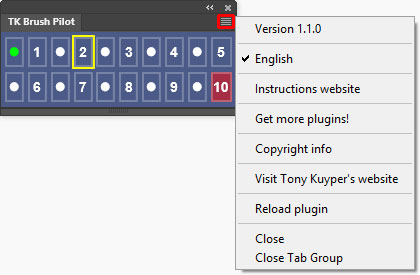
Instructions website—Opens a window using the computer's default browser to this webpage.
Get more plugins!—Opens a window using the computer's default browser to page on Tony Kuyper's website for getting additional free and paid plugins and videos.
Copyright info—Opens a Photoshop window with the plugin's copyright information.
Visit Tony Kuyper's website—Opens a window using the computer's default browser to the index page of Tony Kuyper's website.
Reload plugin—Provides a method to manually reload the plugin in case it's not functioning properly.
The plugin is distributed in a download folder which includes installation directions (it's easy to install). Photoshop 2022 (version 23.3.0) or Photoshop Beta is required to install it, but testing was only done using the latest version of Photoshop. To get the free TK Brush Pilot plugin, follow the directions below.
